
Direct answer
Microsoft Teams vishing Chaos ransomware fake IT support desk risk map: what CRM buyers should take from it
Sophos reported a Teams vishing campaign in which attackers used Microsoft Teams calls, remote access tools, custom malware, and ransomware deployment paths while impersonating IT or support personnel. BleepingComputer and Cybersecurity Dive independently covered the same fake-support and Chaos ransomware angle. CRM and support-ops buyers should respond with a Support Desk Identity Control Map before Teams, helpdesk tickets, RMM tools, and support escalation workflows become trusted attack channels.
Published 8/2/2026. News event: 7/30/2026.
What happened
- Sophos published Chaos in Teams vishing research in July 2026, saying attackers used Microsoft Teams vishing, custom malware, and remote access tools to facilitate ransomware deployment.
- The activity involved attackers posing as IT or helpdesk-style support personnel through Microsoft Teams calls or chats.
- Sophos described use of remote access tools and PowerShell payload chains in user-writable locations such as AppData.
- BleepingComputer reported that the attackers impersonated IT support staff in Teams calls to gain remote access and deploy Chaos ransomware.
- Cybersecurity Dive reported that dozens of U.S. and Canadian firms were targeted and that the motivation appeared financial rather than espionage.
- The support-ops lesson is direct: collaboration calls and helpdesk identity are now part of ransomware prevention, not only user-awareness training.
Why this is trending
- The story had primary threat-research evidence from Sophos and same-week independent coverage from multiple security publications.
- The abuse pattern maps to normal support behavior: a user receives a Teams call or chat, hears a plausible IT-support story, and is asked to grant remote access.
- Support and CRM teams often hold customer records, escalation notes, refunds, identity documents, account changes, and administrative workflows that make a compromised endpoint costly.
- The campaign shows why RMM tools, Quick Assist-style workflows, ticket identity, and collaboration-platform calls need operating proof, not just security policy language.
The CRM Costs take
A CRM or support buyer should not treat fake IT support as only an employee phishing problem. The buyer needs a Support Desk Identity Control Map showing how support personnel prove identity, which remote access tools are allowed, how Teams callers are verified, how users report suspicious support outreach, which tickets trigger security escalation, and who owns customer recovery if a compromised support workflow exposes CRM data.
Support Desk Identity Control Map
A CRM and support-ops buyer framework for validating helpdesk identity, remote access approval, collaboration-platform caller checks, RMM allowlists, user reporting, ticket escalation, and ransomware recovery ownership.
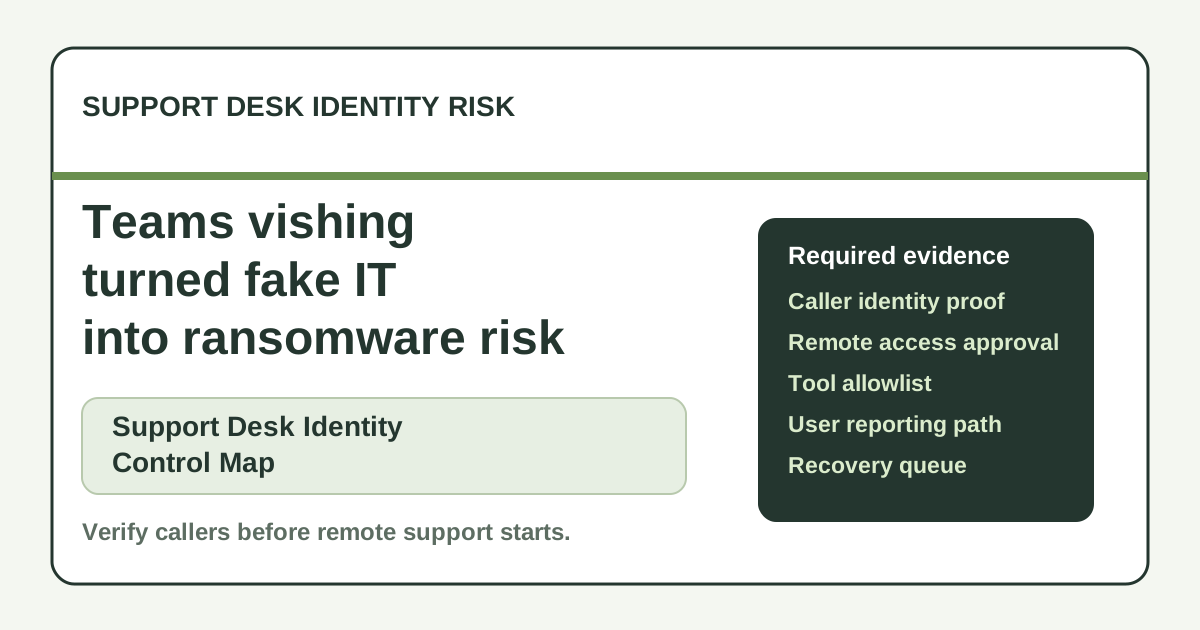
Create a support identity rule with approved channels, callback paths, ticket reference checks, and known-agent directory evidence.
Require ticket-linked approval, allowed tool list, session recording or log capture, admin owner, and user confirmation wording.
Review external access settings, display-name cues, tenant allowlists, warning banners, user training prompts, and suspicious-call reporting.
Build an allowlist, block unapproved RMM tools, log launches, and require security review before support exceptions.
Add a suspicious-support tag, device owner, CRM account scope, affected-record checklist, escalation SLA, and security queue owner.
Create recovery queues for affected customers, account lockouts, sensitive-ticket review, notice scripts, credits, and executive follow-up.
What buyers should do next
Buyer FAQs
What did Sophos report about Teams vishing?
Sophos reported that attackers used Microsoft Teams vishing, remote access tools, custom malware, and ransomware deployment paths while impersonating support or IT personnel.
Why does this matter to support operations?
Support channels and collaboration calls are trusted by employees. If fake support can persuade users to grant remote access, CRM records, tickets, attachments, admin tools, and customer recovery workflows may be exposed.
What proof should buyers ask for first?
Ask for support identity rules, remote access approval evidence, Teams caller checks, RMM allowlists, suspicious-ticket escalation, and ransomware recovery queues.