

Direct answer
Microsoft ShinyHunters Salesforce OAuth abuse CRM risk map: what CRM buyers should take from it
Microsoft published research on July 13, 2026 describing ShinyHunters-style campaigns observed from mid-2025 to mid-2026 that abused trusted OAuth relationships to access customer SaaS applications such as Salesforce instances. Microsoft says the activity used vishing and supply-chain compromise, observed abuse across many tenants, and was not caused by an inherent Salesforce vulnerability. Support-ops buyers should respond by proving which connected apps, user consents, vendor tokens, guest-access paths, telemetry, revocation steps, and customer-recovery workflows protect CRM records.
Published 7/19/2026. News event: 7/15/2026.
What happened
- Microsoft said threat activity associated with ShinyHunters tradecraft targeted customer SaaS applications such as Salesforce instances between mid-2025 and mid-2026.
- Microsoft said attackers abused trusted OAuth relationships for unauthorized access, data exfiltration, and persistence.
- Microsoft described vishing-driven OAuth consent abuse and supply-chain compromise through trusted workflows and integrations such as Salesloft and Gainsight.
- Microsoft said it consulted with Salesforce to improve Defender for Cloud Apps visibility with near-real-time detection, connected-application attribution, and expanded permission insights.
- The Hacker News and RH-ISAC independently covered the campaign and highlighted why approved apps, trusted vendors, and guest-access paths can evade ordinary sign-in monitoring.
Why this is trending
- The campaign turns a common CRM operating habit into a live risk: teams often approve integrations, data loaders, support tools, chat tools, and vendor apps without keeping proof of who owns them later.
- Support teams store customer records, cases, attachments, notes, secrets, and identity-support evidence in CRM systems, so OAuth abuse becomes a customer-service recovery problem as well as a security event.
- Microsoft's new telemetry framing gives buyers a practical test: if the organization cannot attribute API activity to a connected app and its scopes, it cannot confidently explain how CRM data moved.
The CRM Costs take
A support-ops buyer should not treat OAuth exposure as an abstract security backlog. The buyer needs a CRM OAuth Exposure Proof Map: connected-app inventory, user-consent controls, vendor-token ownership, guest-access review, detection telemetry, revocation runbook, and customer-recovery evidence tied to the records support teams actually use.
CRM OAuth Exposure Proof Map
A support-ops buyer framework for auditing CRM OAuth exposure across connected apps, user consent, vendor tokens, guest access, detection telemetry, revocation, and recovery evidence.
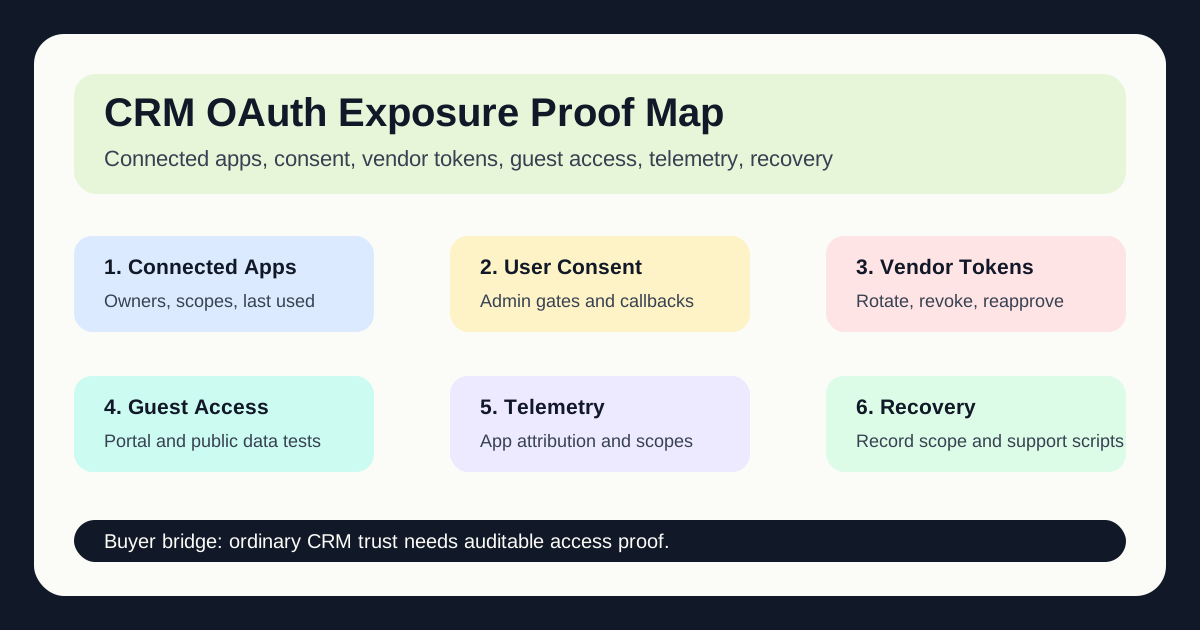
Export connected apps, OAuth scopes, last-used dates, owners, data objects, and support workflows before renewing or expanding access.
Restrict user consent, require admin approval for sensitive scopes, train call-back verification, and log denied consent attempts.
Map vendor tokens, token owners, scopes, refresh-token policy, rotation steps, breach contacts, and emergency revocation order.
Audit guest permissions, exposed objects, portal queries, file visibility, row limits, and test evidence from outside the tenant.
Enable Salesforce event monitoring, connected-app attribution, high-risk scope alerts, API-volume baselines, and case-data queries.
Write the revocation runbook, customer-record scope report, support scripts, identity-support handoff, evidence archive, and reenablement gate.
What buyers should do next
Buyer FAQs
Was this an inherent Salesforce vulnerability?
Microsoft said the activity was not the result of an inherent Salesforce vulnerability. The campaigns abused trusted OAuth relationships, vendor workflows, and access configurations around SaaS applications.
Why does this matter to support operations?
Support operations teams depend on CRM records, cases, attachments, notes, portals, chat integrations, and customer-service vendors. OAuth abuse can turn those normal workflows into data-exfiltration and customer-recovery work.
What proof should CRM buyers request?
Ask for connected-app inventory, OAuth scope review, user-consent controls, vendor-token ownership, guest-access test evidence, API telemetry, revocation runbooks, customer-record scope reports, and support recovery scripts.